Tampilkan postingan dengan label baterai. Tampilkan semua postingan

cara Reset Baterai laptop

Saya baru pakai 3 bulan atau 1tahun kok baterai sudah tidak bisa dipakai :
Baterai dipakai BUKAN BERDASARKAN WAKTU (hari, bulan, tahun), tetapi di-DIHITUNG berdasarkan CYCLE CHARGE-DISCHARGE, setiap satu cycle kemampuan berdasarkan kalkulasi BOARD BATTERY akan berkurang, bukan kemampuan cell baterai. Dimana BOARD BATTERY ada batasan minimum kemampuan baterai yang diperbolehkan. Pada umumnya baterai bisa sampai 400-600 cycle. Jadi kalau dalam satu hari melakukan 30 cycle, kurang lebih baterai dalam 10 hari akan drop
   
Baterai saya charge kok tidak penuh2x hanya sampai xx% :
Kenapa tidak penuh2x, karena Current Capacity di BOARD BATTERY tidak sinkron/SAMA dengan perhitungan Arus dan Voltage CELL BATTERY (CELL IMPEDANCE). Ada beberapa type yang bisa di kalibrasi ada yang di LOCK oleh MANUFACTURE BATTERY (Bukan Manufacture laptop).
   
Lampu charge baterai menyala tetapi kalau adaptor di cabut laptop ikut mati / baterai tidak berfungsi normal 
Kondisi ini biasanya karena SAFETY CIRCUIT di BOARD BATTERY sudah rusak, bisa di akibatkan over current (I), over voltage (V) maupun heat atau panas. Dan didalam BOARD BATTERY terdapat safety circuit 3 lapis dan CUKUP CERDAS
   
Baterai saya simpan (tidak dipasang di laptop) setelah beberapa waktu kok tidak bisa dipakai lagi. Karena KATA ORANG kalau baterai mau awet lebih baik dicabut :
Didalam BOARD BATTERY terdapat “self discharge/day” parameter dimana apabila battery tidak dipakai akan mengurangi “Current Capacity” di BOARD BATTERY , dimana ada minimum CURRENT CAPACITY yang di ijinkan oleh BOARD BATTERY. Apabila terlalu rendah maka BOARD BATTERY akan mengaktifkan SAFETY CIRCUIT, alias bunuh diri.


Ok bro kita mulai pecahkan masalah ini,
pada umumnya baterai laptop teridiri dari 6 bagian pokok :


perlu di ingat bahwa dari ke 6 bagian diatas semuanya berpotensi RUSAK, hanya 1 yg berpotensi rusak secara FIRMWARE yaitu pada bagian F.
Nah.....untuk menjawab ke 4 point kerusakan baterai diatas ?, sebelumnya saya mau tanya agan2 semua, apa yg agan2 lakukan jika printer agan error WASTE TANK FULL? (kalau didunia baterai laptop istilahnya CYCLE COUNT) jawabanya pasti SOFTWARE RESETTER. begitu juga baterai laptop .

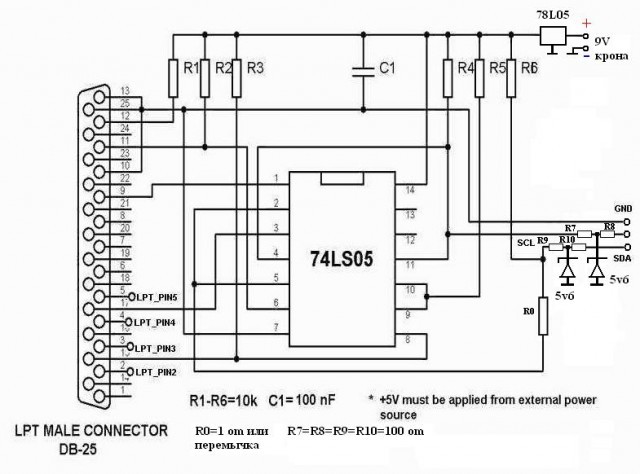
tidak seperti mereset printer, untuk mereset baterai agan2 membutuhkan sebuah interface yang menghubungkan antara baterai dan komputer yg masih mempunya port LPT1, interfacenya agan2 bisa buat sendiri, tapi untuk yg buta elektro bisa minta bikinin temen yg kebetulan melek elektro ato ke tukang service radio 4 band hehehehe.......
ok next....eh jangan lupa ngopi dulu...ama rokoknya dihisap dalam2 hehehehehe
cekidot skemanya......

ok jika udah selesai, agan tinggal hubungkan baterai dengan komputernya melalui inetrface yg undah kita bikin....????????
next agan2 membutuhkan software kan? pasti itu......
ok...... dari sekian banyak software untuk proyek ini saya cuma merekom 3 yg pernah saya coba


    be2work
    SBWorkshop 3.71
    ACCPlus


kalau agan2 mau download......tanyakan aja sama mbah google


selanjutnya jika agan2 sudah akrab dengan pekerjaan ini, para agan akan bisa membaca data dari dalam baterai lepi, kurang lebih seperti ini datanya :

DesignCapacity: 32767 mAh
FullChargeCapacity: 32767 mAh
CycleCount: 32767
Date: 2043.15.31 ymd
DesignVoltage: 32767 mV
ManufactureName: Read ERROR
DeviceName: Read ERROR
SerialNumber: 32767
ChargingCurrent: 32767 mA
ChargingVoltage: 32767 mV
DeviceChemistry: Read ERROR
Temperature: 30,5 C
Voltage: 32767 mV
Current: 32767 mA
RelativeSOC: 32767 percents
AbsoluteSOC: 32767 percents
RemainingCapacity: 32767 mAh

tapi dari semua diatas tidak menutup kemungkinan untuk merepair baterai secara hardware, contoh : ganti cell yang soak, ganti fuse yang putus dll

sumber : http://forum.laptop717.com/index.php?topic=224.0


How to Repair a Laptop Battery


Most laptop batteries are smart. This means that the pack consists of two parts: the chemical cells and the digital circuit. If the cells are weak, cell replacement makes economic sense. While nickel-based cells are readily available, lithium-ion cells are commonly not sold over the counter, and most manufacturers only offer them to authorized pack assemblers. This precaution is understandable given liability issues. Read also about Safety Concerns and Protection Circuits. Always use the same chemistry; the mAh rating can vary if all cells are replaced.
A laptop battery may have only one weak cell, and the success rate of replacing the affected cell depends on the matching with the others. All cells in a pack must have a similar capacity because an imbalance shortens the life of the pack. Read more about Can Batteries Be Restored?. Furthermore, the state-of-charge of all cells being charged for the first time should have a similar charge level, and the open-circuit voltages should be within 10 percent of each other. Welding the cells is the only reliable way to get dependable connection. Limit the heat transfer to the cells during welding to prevent excess heat buildup.
The typical SMBus battery has five or more battery connections consisting of positive and negative battery terminals, thermistor, clock and data. The connections are often unmarked; however, the positive and negative are commonly located at the outer edges of the connector and the inner contacts accommodate the clock and data. (The one-wire system combines clock and data.) For safety reasons, a separate thermistor wire is brought to the outside. Figure 1 illustrates a battery with six connections.

Figure 1: Terminal connection of a typical laptop battery
The positive and negative terminals are usually placed on the outside; no norm exists on the arrangement of the other contacts.
Courtesy of Cadex
Some batteries are equipped with a solid-state switch that is normally in the “off” position and no voltage is present on the battery terminals; connecting the switch terminal to ground often turns the battery on. If this does not work, the pack may need a proprietary code for activation, and battery manufacturers keep these codes a well-guarded secret.
How can you find the correct terminals? Use a voltmeter to locate the positive and negative battery terminals and establish the polarity. If no voltage is available, a solid-state switch in the “off” position may need activating. Connecting the voltmeter to the outer terminals, take a 100-Ohm resistor (other values may also work), tie one end to ground, and with the other end touch each terminal while observing the voltmeter. If no voltage appears, the battery may be dead or the pack will require a security code. The 100-Ohm resistor is low enough to engage a digital circuit and high enough to protect the battery against a possible electrical short.
Establishing the connection to the battery terminals should now enable charging. If the charge current stops after 30 seconds, an activation code may be required, and this is often difficult if not impossible to obtain.
Some battery manufacturers add an end-of-battery-life switch that turns the battery off when reaching a certain age or cycle count. Manufacturers argue that customer satisfaction and safety can only be guaranteed by regularly replacing the battery. Such a policy tends to satisfy the manufacturer more than the user, and newer batteries do not include this feature.
If at all possible, connect the thermistor during charging and discharging to protect the battery against possible overheating. Use an ohmmeter to locate the internal thermistor. The most common thermistors are 10 Kilo Ohm NTC, which reads 10kΩ at 20°C (68°F). NTC stands for negative temperature coefficient, meaning that the resistance decreases with rising temperature. In comparison, a positive temperature coefficient (PTC) causes the resistance to increase. Warming the battery with your hand may be sufficient to detect a small change in resistor value when looking for the correct terminal on the battery.
In some cases the chemical battery can be restored, but the fuel gauge might not work, is inaccurate, or will provide wrong information. After repackaging, the battery may need some sort of initialization/ calibration process. Simply charging and discharging the pack to reset the flags might do the trick. A “flag” is a measuring point to mark and record an event.
 The circuits of some smart batteries must be kept alive during cell replacement. Disconnecting the voltage for only a fraction of a second can erase vital data in the memory. The lost data could contain the resistor value of the digitized shunt that is responsible for the coulomb counter. Some integrated circuits (IC) responsible for fuel gauge function have wires going to each cell, and the sequence of assembly must to be done in the correct order.
To assure continued operation when changing the cells, supply a secondary voltage through a 100-Ohm resistor to the circuit before disconnection and remove the supply only after the circuit receives voltage again from the new cells. Cell replacement of a smart battery has a parallel with open-heart surgery, where doctors must keep all organs of the patient alive.
Anyone repairing an SMBus battery needs to be aware of compliance issues. Unlike other tightly regulated standards, the SMBus allows some variations, and this can cause problems when matching battery packs with existing chargers. The repaired SMBus battery should be checked for compatibility before use. More information on SMBus is available on www.sbs-forum.org and www.acpi.info.

Simple Guidelines when Repairing Battery Packs

  • Only connect cells that are matched and have the identical state-of-charge. Do not connect cells of different chemistry, age or capacity.
  •  
  • Never charge or discharge Li-ion batteries without a working protection circuit unattended. Each cell must be monitored individually.
  •  
  • Include a temperature sensor that disrupts the current on high heat.
  •  
  • Apply a slow charge only if the cells have different state-of-charge.
  •  
  • Pay special attention when using an unknown brand of cells. Some may not contain a high level of intrinsic safety features.
  •  
  • Li-ion is sensitive to reverse polarization. Observe correct polarity.
  •  
  • Do not charge a Li-ion battery that exhibits physical damage or has dwelled at a voltage of less than 1.5V/cell.
  •  
  • When repairing Li-ion, assure that each cell is connected to a protection circuit.
source : http://batteryuniversity.com/learn/article/how_to_repair_a_laptop_battery 

cara service baterai laptop consider replacing your battery

Anda yang pernah mengalami kejadian mendapatkan notifikasi “consider replacing your battery” disertai dengan munculnya tanda silang merah di ikon baterai yang ada di system tray sistem operasi Windows 7. Notifikasi tersebut  terdapat pada Windows 7 yang menganggap baterai laptop Anda sudah saatnya diganti.

Apabila Anda mengalami masalah “consider replacing your battery” seperti di atas, jangan terburu buru untuk membeli / mengganti baterai anda. Ada suatu cara sederhana untuk menghilangkan notifikasi yang mengganggu tersebut. Berikut langkah-langkahnya:
1. Charge baterai anda sampai full (99% – 100%), setelah itu matikan laptop Anda. Sampai tahap ini jangan dulu cabut charger-nya.
2. Hidupkan laptop Anda lalu tekan F8 berulang-ulang sampai muncul menu Advanced Boot Options. Pilih Safe Mode.

Setelah sudah masuk ke dalam Windows Safe Mode, barulah cabut charger baterai laptop Anda.

Biarkan saja laptop menyala sampai mati sendiri karena baterainya benar-benar habis. Sangat disarankan untuk tidak mengoperasikan laptop Anda selama proses ini. Biarkan saja sampai laptop mati sendiri.
Setelah mati, pasang kembali charger laptop Anda, lalu nyalakan kembali laptop Anda dengan normal. Hasilnya…semua kembali normal! Notifikasi “consider replacing your battery” dan tanda silang merah di icon baterai tidak muncul lagi.

Teknik di atas pada dasarnya adalah suatu cara untuk mengkalibrasi kapasitas baterai laptop Anda. Dengan menjalankan laptop mulai dari kondisi awal baterai penuh (kapasitas 100%) sampai benar-benar habis (kapasitas 0%), maka Windows 7 jadi “tahu” kapasitas sebenarnya (real capacity) dari baterai laptop, dan secara otomatis men-setting ulang parameter-parameter yang berkaitan dengan baterai laptop tersebut.

Cara Kalibrasi Baterai Laptop & Cara merawat yang benar

Berikut ini adalah cara merawat baterai laptop dengan benat dan juga cara melakukan kalibrasi baterai laptop agar awet.

1.Jangan charge hingga kepenuhan saat laptop mati
Melakukan charge kepenuhan terbukti menyebabkan lama daya tahan baterai berkurang. Secara teknis emang ana tidak tahu tapi udah saya buktikan dan teman ana pun juga membuktikan. Terutama kebiasaan mencharge laptop kemudian ditinggal tidur dan pagi2 setelah kita bangun led baterai laptop udah pertanda penuh.

2. Jangan lepas baterai ketika laptop dihidupkan (mode AC)
a. Mode AC tanpa baterai memungkinkan terjadi kerusakan pada motherboard akibat listrik tidak stabil / listrik mati mendadak, dan jika motherboard rusak sama aja dengan kerusakan pada laptop keseluruhan. Tapi memang menghemat baterai (namax juga gak dipakai, ya pasti awet tu baterai)
b.Mode AC dengan baterai memungkinkan terjadi penurunan kualitas baterai tapi sangat aman bagi kesehatan laptop jika terjadi listrik mati mendadak.
jadi saya sarankan agar tidak melepas baterai saat menggunakan laptop
PILIH MANA (MOTHERBOARD RUSAK ATAU BATERAI RUSAK)

3. Lepas baterai laptop jika laptop tidak digunakan dalam jangka waktu lama (> 24 jam)

4. Lakukan kalibrasi baterai setiap 30 kali charge (default)
Kalibrasi digunakan agar kalkulasi baterai tetap akurat.

Berikut caranya:
a. Charge laptop sampai penuh (100%) dan biarkan kabel charge tertancap selama 2 jam sembari digunakan laptop buat aktifitas
b. Aktifkan system hibernate
c. Setting agar system hibernate dijalakan otomatis jika baterai laptop udah habis (critical battery)
d. Gunakan laptop degan aktifitas2 anda dan tunggu sampai baterai habis dan system hibernate dilakukan
e. Selama hibernate, diamkan laptop selama +- 8 jam dengan kondisi baterai tetap tertancap
f. Setelah 8 jam, charge laptop selama sampai penuh namun laptop dalam kondisi masih hibernate (belum dihidupkan).

Gunakan software battery care agar tidak perlu repot2 menghitung berapa kali kita men-charge baterai laptop. Karena software ini akan mencatatnya hingga looping ke berapa kita mencharge baterai laptop.

Cara Memaksimalkan Baterai Laptop

Penggunaan Laptop agar kinerjanya jadi maximal sangat tergantung dari kinerja baterai laptop itu sendiri. Dan juga tergantung dari anda sendiri memperlakukan baterai laptop agar diperoleh hasil yang memuaskan.
untuk itu kami akan berikan tips untuk memaximalkan baterai laptop sesuai yang direkomendasikan banyak perusahaan laptop, seperti dibawah ini:

1. Penanganan untuk baterai baru
Baterai baru belum terisi penuh saat dijual . Maka perlu di charger terlebih dahulu untuk mendapatkan kapasitas optimal. Pengisian dan pemakaian baterai sampai 4 atau 5 kali sudah cukup untuk kondisi tersebut .
2. Kebersihan Baterai harus diperhatikan
Kotoran pada kontak baterai dapat mengurangi kinerjanya . Membersihkan dengan alkohol / thinner A dan kapas dapat membuatnya bersih dan bekerja seperti baterai baru .
3. Penggunaan AC Adaptor
Ini direkomendasikan bagi anda yang menggunakan AC adaptor  untuk jangka waktu yang lama . Disarankan agar Anda menggunakan baterai Anda setidaknya sekali dalam dua minggu . Karena Kapasitas Baterai akan berkurang ketika disimpan untuk waktu yang lama. Maka jangan sampai kehabisan.
4. Menyimpan Baterai
Ketika tidak digunakan untuk waktu yang lama , baterai Anda harus disimpan dalam tempat yang bersih, kering , dan sejuk yang bebas dari panas dan logam lainnya .
5. Menggunakan fitur management power pada laptop
Penggunaan fitur ini sangat di anjurkan ..anda bisa mengatur Prossecor pada kecepatan rendah .atau dengan mengatur kecerahan lcd pada setelam minimum. sehingga daya yang dikonsumsi jadi lebih rendah, sehingga baterai bisa lebih tahan lama

 
Design by jhonzka